Where they look.What they read.Before you publish.
AI attention heatmaps on any design, live URL — or the page Lovable just built you. Down to the exact words your visitors will actually read.

See exactly where eyes land
before a single click.
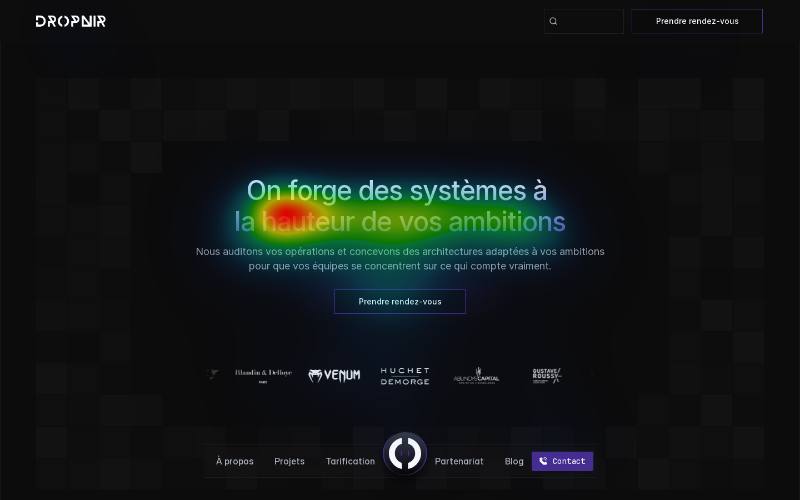
A real scan, not a mockup: this is dropnir.com as our model sees it — the same output every report ships with.
WHAT THE REPORT ANSWERS
Not sure your page works?
Your visitors decided in five seconds.
“Does my hero grab attention — or do they scroll past?”
Every screen of scroll gets its own attention score. You see the exact pixel where the eye gives up.
REAL OUTPUT — DROPNIR.COM · DESKTOP · 7 SECTIONS
Here: attention collapses to 4/100 by the third screen. That's where this site loses its visitors — and where the report tells you to act.
“Is my CTA inside the hot zone?”
The report maps where the eye lands first — and flags what you put there instead.
Primary zone: Top-center
Your CTA: Bottom-left ✗
5% of predicted attention reaches it.
“Which words get read — and which get skipped?”
Words Map — word-level reading attention on your actual copy. No other tool does this.
Our platform empowers teams to seamlessly optimize workflows — cut reporting time from 3 hours to 20 minutes, starting at $29.
The eye locks onto numbers and stakes. It skips the adjectives you spent an hour on. The report rewrites them.
Discover Words Map→One page in. Six reads out.
Every mode runs on the same UNISAL perception model — trained on 300K+ human eye-tracking samples.
LIVE · 190MS/FRAMEREAL OUTPUT — DROPNIR.COM SCAN · NOTHING MOCKED
WHO IT'S FOR
BUILDING WITH AI
Score pages before you pay for traffic
Lovable, v0 or Bolt built your landing in 30 seconds. Nobody told you if it works. Score it, fix the cold zones, then spend on ads.
Free tier · no card required
Score a page free→
FREELANCE CRO / UX
Objectify your recommendations
“The eye misses your CTA” lands harder with a heatmap attached. Put the report in your proposal, white-label it in your audit, and bill it as your own.
PDF reports · white-label on Agency
See plans→
AGENCY
Audit every page you ship
One click scans a whole site — every page gets its own scored report, ready to send. Justify design choices before the client asks.
Multi-page reports · runs server-side
Try Report Studio→
IN YOUR STACK
One attention model. In your design file, your browser, your pipeline.
Figma plugin
Heatmap any frame before a line of code exists. Four scores, top insight, and the overlay dropped on the canvas for your next review.
- Analyze any frame in seconds
- Add the heatmap as a layer
- Compare two variants by score
Discover the plugin→
Chrome extension
Server scanners stop at the login page. The extension heatmaps whatever you're browsing — dashboards, checkouts, staging — live, as you scroll.
- Live overlay while you scroll
- Works on pages no scanner reaches
- Full report from the current tab
Discover the extension→
Web — any URL
Paste a URL, get the full picture: multi-device attention report, SEO audit, word-level copy analysis. Whole-site mode included.
- Multi-device scored reports
- One click for the whole site
- Shareable links & PDF export
Try it free→
THE MODEL
Built on published research, not a black box.
Heatpoints runs UniSAL, a peer-reviewed saliency model benchmarked on public academic datasets (SALICON, MIT300). We'll always tell you what prediction can and cannot see.
UniSAL
PEER-REVIEWED MODEL
SALICON
BENCHMARK DATASET
< 5 s
PER ANALYSIS
Start free.
Upgrade when it pays for itself.
Transparent plans, self-serve, cancel anytime. One avoided redesign of a hero section pays for a year of Pro.
A UX audit bills at €2,000–8,000. One white-label report sold pays back your year.
Try it on your own designs.
- 10 analyses / month
- Multi-device reports
- SEO audit
- Copy / text analysis
- PDF export (watermarked)
- Unlimited history
For freelancers and CRO consultants.
- 300 analyses / month
- Multi-device reports
- SEO audit
- Copy / text analysis
- Competitor benchmark
- Whole-site scan
- Fix — AI corrections
- Scrollcast video
- PDF reports without watermark
- API access
- 12 months history
For teams shipping client work.
- Unlimited analyses (fair use)
- Multi-device reports
- SEO audit
- Copy / text analysis
- Competitor benchmark
- Whole-site scan
- Fix — AI corrections
- Pulse analytics
- Scrollcast video
- PDF reports without watermark
- White-label reports
- API access
- 5 seats
- Unlimited history
- Priority support
The questions everyone asks
How accurate are AI attention heatmaps?+
Heatpoints runs UniSAL, a peer-reviewed saliency model (ECCV 2020) benchmarked on public academic datasets like SALICON and MIT300. It predicts where human eyes land in the first seconds of viewing — and we always tell you what prediction can and cannot see.
How is this different from Hotjar or Microsoft Clarity?+
Those tools record real visitors — you need live traffic, a tracking script and a consent banner, then weeks of data. Heatpoints predicts attention before you publish: no traffic, no script, results in seconds. Many teams use both: predict first, verify later.
Do I need to install anything on my site?+
No. Paste a URL or upload a screenshot — the analysis runs on a capture of the page. Nothing is added to your site and your visitors are never tracked.
Does it work on designs that aren't live yet?+
Yes — upload a JPG or PNG of a mockup, or run the Figma plugin on any frame. The Chrome extension also covers pages a scanner can't reach, like dashboards behind a login.
What's included for free?+
The public score /100 with a heatmap and a first insight, no account needed — and 10 full analyses a month with a free account, no card required.
Know where they look.
Before you publish.
Paste a URL — score /100, heatmap and first insight in seconds. Free, no signup.
Drop your interface
or click to browse files
JPG, PNG · Max 10 MB